s0meter
Count the S0 pulses of electricity, water and gas meters on a Raspberry Pi — and see them live.




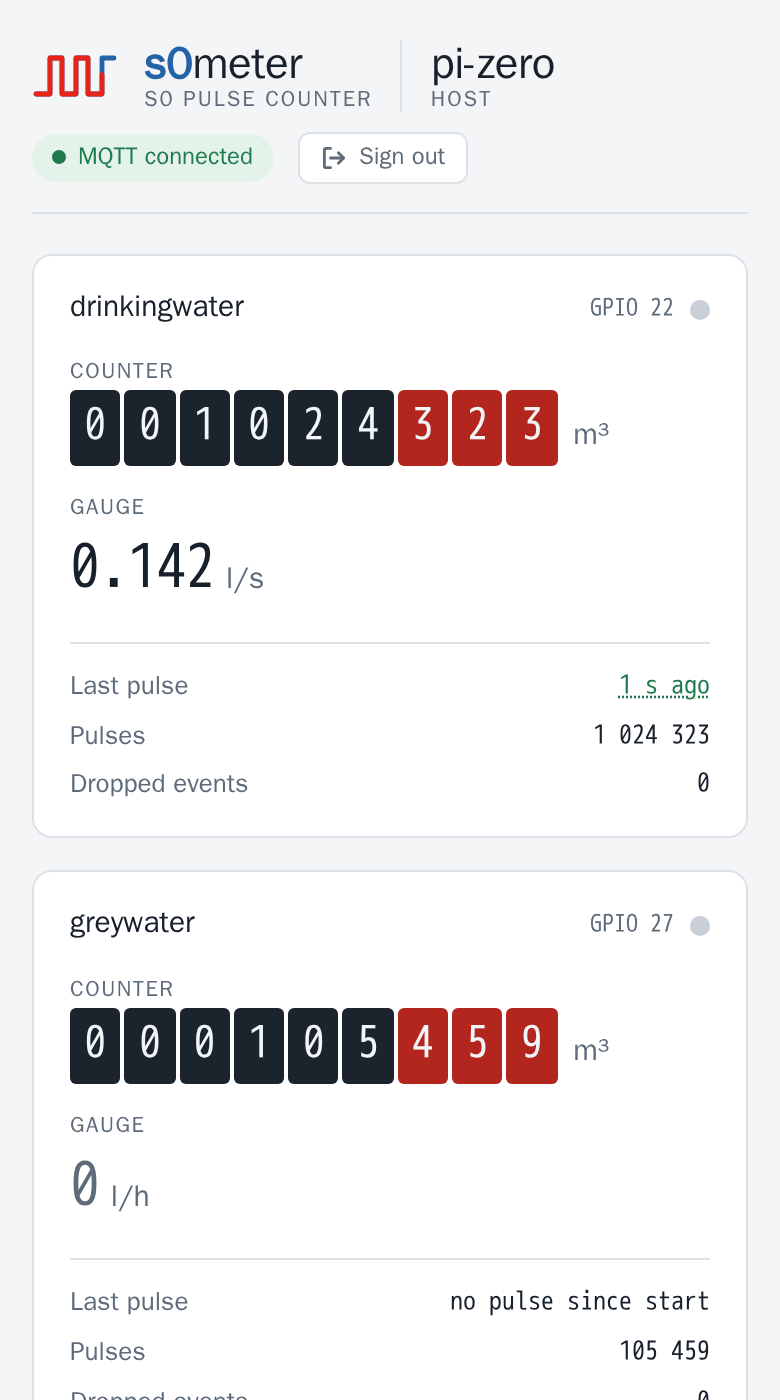
Got a Pi and a meter with an S0 output? The Quick start gets you from download to the live page in about ten minutes.
Almost every electricity meter, and many water and gas meters, has an S0 pulse output (DIN 43864): one short pulse per Wh or litre. Wire it to a GPIO pin of a Raspberry Pi — a Pi Zero is plenty — and s0meter turns those pulses into meter readings:
- the total (
counter) and the current power or flow (gauge) of every meter, - published via MQTT on every pulse, ready for Node-RED, Home Assistant, ioBroker or openHAB,
- shown live on a built-in web page, with the counter as a meter register and a pulse LED that flashes like the one on the meter,
- saved regularly and on every shutdown, so a reboot keeps the reading.
No cloud, no database, no runtime: a single binary, configured with one YAML file.
Features
- Live web page per device: counter register, gauge, last pulse, pulse LED, MQTT state — readable on a phone, light and dark mode
- Display units: count in Wh or litres, read in kWh or m³ like on the meter
- MQTT publishing on every counted pulse (throttled), plus a heartbeat
- Persistent counters: saved every
backupIntervaland on shutdown, written atomically so a power cut cannot corrupt the file (it costs at most the pulses since the last save) - Lost pulses recovered: pulses the GPIO layer dropped are counted late, not lost
- HTTPS REST API (TLS 1.3) with one bearer token per caller, stored only as a SHA-256 hash and
managed with
s0meter token; IP allowlist / blocklist; the log names who calls - Hot reload of the configuration via
SIGHUP; a broken file is refused, counting goes on - Release builds for every Raspberry Pi architecture, from the Pi Zero (ARMv6) to 64-bit systems; developed and run on a Pi Zero
Quick start
1. Download the archive for your Pi from the latest release:
| Archive | Raspberry Pi model |
|---|---|
linux_armv6 |
Pi 1 and Zero (1st gen) |
linux_armv7 |
Pi 2 / 3 / 4 / 5 / Zero 2 W with a 32-bit OS |
linux_arm64 |
Pi 3 / 4 / 5 / Zero 2 W with a 64-bit OS |
VERSION=7.0.1 ARCH=armv6        # see the release page for the latest version
BASE=https://github.com/womat/s0meter/releases/download/v$VERSION
curl -LO $BASE/s0meter_${VERSION}_linux_$ARCH.tar.gz -LO $BASE/checksums.txt
sha256sum -c checksums.txt --ignore-missing
tar xzf s0meter_${VERSION}_linux_$ARCH.tar.gz
2. Install binary, example configuration and a certificate. Everything belongs to root except
data/, where s0meter keeps the counters; the service user s0meter may read etc/:
sudo groupadd -r -f s0meter
sudo useradd -r -s /usr/sbin/nologin -g s0meter s0meter
sudo usermod -aG gpio s0meter
sudo install -d -o root -g root -m 755 /opt/s0meter /opt/s0meter/bin
sudo install -d -o root -g s0meter -m 750 /opt/s0meter/etc
sudo install -d -o s0meter -g s0meter -m 750 /opt/s0meter/data

sudo install -o root -g root -m 755 s0meter /opt/s0meter/bin/
sudo install -o root -g s0meter -m 640 config/config.yaml /opt/s0meter/etc/
sudo openssl req -x509 -nodes -newkey rsa:2048 -days 825 \
  -keyout /opt/s0meter/etc/key.pem -out /opt/s0meter/etc/cert.pem -subj "/CN=$(hostname)"
sudo chown root:s0meter /opt/s0meter/etc/key.pem /opt/s0meter/etc/cert.pem
sudo chmod 640 /opt/s0meter/etc/key.pem
Why root: whoever can write config.yaml or the token file can add a token of their own, and
whoever can write bin/s0meter can replace the program. s0meter itself needs neither.
3. Configure /opt/s0meter/etc/config.yaml: set env: prod, your MQTT broker (or delete the
mqtt block) and one entry per meter — see Configuration and Wiring.
Then create a token for each caller, here the browser:
sudo /opt/s0meter/bin/s0meter token add browser
It prints the token once; keep it, e.g. in a password manager. See Tokens.
4. Start it as a service, with the unit from the archive, and open the firewall:
sudo install -m 644 contrib/s0meter.service /etc/systemd/system/
sudo systemctl daemon-reload
sudo systemctl enable --now s0meter
sudo ufw allow 8443/tcp          # if ufw is active
journalctl -u s0meter -n 20      # "Module started successfully"
The unit runs s0meter in a sandbox: no capabilities, a read-only system except data/, only the
GPIO chip as a device. A logDestination file has to go to data/ as well.
5. Open https://<your-pi>:8443/, accept the self-signed certificate and enter the token.
Raspberry Pi OS often keeps the journal in RAM only, so the log of a crash is gone after the reboot.
Check with grep Storage /etc/systemd/journald.conf; if it says volatile or is unset, make it
persistent:
sudo mkdir -p /etc/systemd/journald.conf.d
printf '[Journal]\nStorage=persistent\n' | sudo tee /etc/systemd/journald.conf.d/persistent.conf
sudo systemctl restart systemd-journald
Wiring
An S0 output is a potential-free switch, usually an optocoupler, with the terminals S0+ and
S0−. Connect S0+ to a GPIO pin (BCM numbering, gpio in the configuration) and S0− to
GND. s0meter enables the Pi’s internal pull-up, so the line idles high, each pulse pulls it low,
and the rising edge at the end of the pulse is counted. The reed contacts of water and gas meters
are wired the same way.
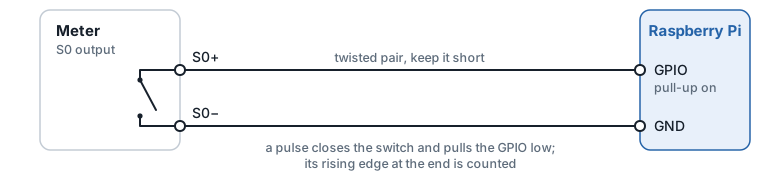
- Never connect S0+ to a voltage: the GPIO pins take 3.3 V at most.
- DIN 43864 allows the S0 circuit to run at up to 27 V, but most meters switch the Pi’s 3.3 V fine. If the meter’s data sheet asks for a minimum current, add an external pull-up of a few kΩ from the GPIO to 3.3 V.
- Long cables pick up noise; a twisted pair and a sensible debounce time help.
With an optocoupler (galvanic isolation)
The direct connection ties the meter’s S0 circuit to the Pi’s ground. That is fine for a meter next to the Pi, but an optocoupler between them is the safer choice when
- the cable is long or leaves the cabinet, e.g. to a water meter in the basement,
- the meter sits in a distribution board with mains wiring, or another circuit’s ground is involved,
- the S0 circuit is to run at its specified voltage (12–24 V) instead of the Pi’s 3.3 V.
A PC817 (also sold as LTV-817 or EL817, same pinout) does the job: cheap, available everywhere and far faster than S0 needs. The meter switches the optocoupler’s LED, powered by its own supply, and the optocoupler’s transistor takes the meter’s place on the Pi:
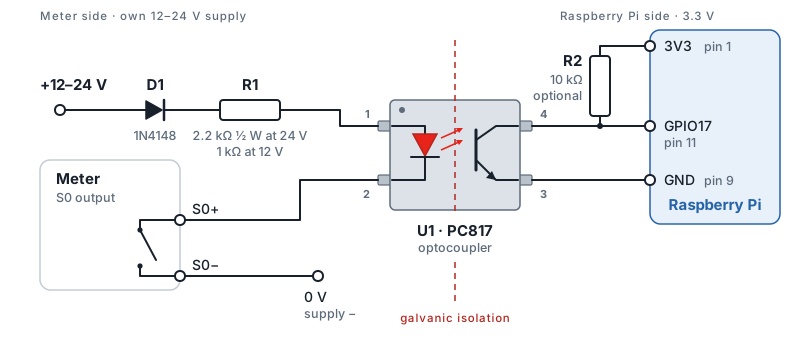
| Ref | Part | Value | Notes |
|---|---|---|---|
| U1 | Optocoupler | PC817 (LTV-817, EL817) | pin 1 anode, 2 cathode, 3 emitter, 4 collector |
| R1 | Resistor, LED side | 2.2 kΩ ½ W at 24 V · 1 kΩ ¼ W at 12 V | about 10 mA (24 V) or 9 mA (12 V) LED current, within the S0 limit of 27 mA (DIN 43864); at 24 V it dissipates about 0.2 W |
| R2 | Resistor, pull-up | 10 kΩ ¼ W, GPIO to 3V3 | optional: s0meter enables the internal pull-up (about 50 kΩ) anyway; R2 gives a firmer level and cleaner edges, worth it on longer cables |
| D1 | Diode | 1N4148, in series with R1, anode to the supply’s + | recommended: blocks the current of a swapped supply and so protects both the PC817’s LED (6 V in reverse at most) and the meter’s S0 output, which is polarized and often an optocoupler itself |
R1 = (supply − 1.2 V LED − 0.7 V D1 − about 1 V across the S0 output) / 10 mA, rounded to the next standard
value. A pulse switches the transistor on and pulls the GPIO low, exactly like the direct
connection, so the configuration does not change. Any GPIO works; GPIO17 is only the example.
Ready-made S0 input modules with an optocoupler work the same way.
Maximum pulse rate
Four limits apply; the lowest one counts:
| Limit | Maximum | Notes |
|---|---|---|
| S0 interface (DIN 43864) | about 16 Hz | pulse at least 30 ms, pause at least 30 ms |
| s0meter’s debounce | 1 / (2 × debounceTime) |
pulse and pause must each outlast the debounce: 10 ms → 50 Hz, 20 ms → 25 Hz |
| PC817 with 10 kΩ pull-up | a few kHz | switching times of a few to some tens of µs; irrelevant for S0 |
| Raspberry Pi, even a Zero | far above any S0 rate | edges are timestamped by the kernel and buffered; a burst that overruns the buffers is counted late, not lost — see droppedEvents |
In practice the meter is the limit, and the debounce has to stay below its pulse and pause length. At 1000 imp/kWh, 22 kW is about 6 pulses per second. A meter with 10 000 imp/kWh, however, reaches the S0 limit of 16 Hz at only about 5.8 kW; check whether such a meter uses shorter pulses than S0’s 30 ms, and keep the debounce below them. Check the meter’s data sheet for its pulse length and maximum frequency, and see Choosing a debounce time.
Web UI
https://<host>:8443/ opens a diagnostic page with one card per meter: the counter as a meter
register and the gauge, both in the meter’s display units, the age of the last
pulse, the raw pulse count, the dropped events and a pulse LED. The LED flashes once per counted
pulse, spread over the 3-second refresh because the page only learns how many pulses were added;
the wave in the logo fires whenever any meter counts. The header names the host and shows the MQTT
state; its tooltip names the broker as host:port and the topics of the meters, e.g.
192.168.1.5:1883 · home/wallbox, home/water. The footer the time of the last update, the uptime and the version. The browser tab reads
s0meter · <host>, so several devices can be told apart.
The page refreshes every 3 seconds while the tab is visible and marks the values as stale when the device stops answering.
The page itself is public and contains no data. On the first visit it asks for a token
(s0meter token add browser), keeps it in the browser’s local storage and sends it as a bearer
token to /health; “Sign out” removes it, and a rejected token brings the prompt back. It is a single file embedded in the
binary, with no external fonts or scripts, so it works without internet access.
Configuration
Default location: /opt/s0meter/etc/config.yaml
Environment variables are expanded inside the file in the ${VAR} form only, e.g.
connection: tcp://s0meter:${MQTT_PASSWORD}@broker:1883; an unset variable becomes empty. Any
other $ is kept literally, so passwords may contain it. Unknown keys are rejected, so a misspelled or renamed setting
stops the start instead of silently keeping its default. Durations need a unit (10ms, 2s, 1m):
a bare number, 0 included, is rejected.
# =============================================================================
# s0meter configuration
# =============================================================================

# logLevel defines the minimum log level.
# Messages with at least this level are logged.
# Allowed values: debug | info | warn | error
logLevel: info

# logDestination defines where logs are written to.
# Supported values: stdout | stderr | /path/to/logfile
logDestination: stdout

# environment: dev | prod
# With prod, a missing webserver.certFile is an error; dev falls back to the embedded,
# publicly known development certificate.
env: dev


# =============================================================================
# Webserver configuration (HTTPS)
# =============================================================================
webserver:
  # Host address the HTTPS server listens on (0.0.0.0 = all interfaces)
  listenHost: 0.0.0.0

  # Port the HTTPS server listens on
  listenPort: 8443

  # Bearer tokens accepted on the protected endpoints, one "<name> <sha256>" per line.
  # Manage it with "s0meter token add|remove|list"; a relative path is relative to this file.
  # The file holds hashes only, but whoever can write it can add a token: owner root.
  tokenFile: /opt/s0meter/etc/token-hashes

  # TLS private key file
  keyFile: /opt/s0meter/etc/key.pem

  # TLS certificate file
  certFile: /opt/s0meter/etc/cert.pem

  # Blocked IP addresses or networks (empty = none blocked)
  # Examples: 192.168.0.1, 192.168.0.0/16, 10.0.0.0/8
  blockedIPs: [ ]
  #  - 192.168.0.1
  #  - 192.168.0.0/16

  # Allowed IP addresses or networks (empty = all allowed)
  # Note: ::1 is the IPv6 loopback address
  # Examples: 127.0.0.1, ::1, 192.168.0.0/16
  allowedIPs: [ ]
  #  - 127.0.0.1
  #  - ::1
  #  - 192.168.0.0/16

# =============================================================================
# Data collection
# =============================================================================

# File where counters are persisted
dataFile: /opt/s0meter/data/s0meter.yaml

# Interval as Go duration string (e.g. 60s) for saving counters to dataFile
backupInterval: 60s

# =============================================================================
# MQTT configuration (on when this block is present; delete or comment it out to run
# without MQTT)
# =============================================================================
mqtt:
  # Broker connection string, required
  connection: "tcp://mqtt.example.com:1883"

  # Heartbeat: every meter is published at least this often, as a Go duration string
  # (default 60s)
  publishInterval: 60s

  # How often the publish loop checks for new pulses. A meter is published as soon as a new
  # pulse is counted, but never more than once per minPublishInterval - this throttles a
  # fast pulsing meter. Default 2s; set to 0s to publish on the heartbeat only.
  minPublishInterval: 2s

# =============================================================================
# S0 Meter configurations
# =============================================================================
# gpio                 - GPIO for the S0 input, BCM numbering 2-27, one meter per GPIO
# debounceTime         - Debounce time as Go duration string (e.g. 10ms) to suppress contact bounce and noise; 0s or unset = none
# counterPulsesPerUnit - Meter constant (Zählerkonstante): pulses per counterUnit
#                        (see meter datasheet, e.g. 1000 imp/kWh)
# counterUnit          - Unit of the total counter (e.g. kWh, m³, l)
# counterPrecision     - Decimal places for rounding the counter value
# gaugeUnit            - Unit of the flow rate (e.g. kW, W, l/h, l/s)
# gaugeScale           - Amount per pulse in gaugeUnit per hour; the gauge is pulses per hour
#                        times gaugeScale and ignores counterPulsesPerUnit.
#                        1 pulse = 1 Wh: W 1, kW 0.001 - 1 pulse = 1 l: l/h 1, l/s 0.000277778
# gaugePrecision       - Decimal places for rounding the gauge value
# mqttTopic            - MQTT topic to publish meter data (empty = disabled)
# mqttRetained         - Broker keeps the last message of this topic (default: false)
# displayUnit          - Unit the web UI shows the counter in (empty = counterUnit), e.g. Wh -> kWh,
#                        l -> m³. Display only, MQTT and the API keep counterUnit.
#                        Known units: Wh kWh MWh | l m³ m3 | s min h
# displayGaugeUnit     - Unit the web UI shows the gauge in (empty = gaugeUnit).
#                        Known units: W kW MW | l/s l/min l/h m³/h m3/h
# =============================================================================
meter:
  wallbox:
    gpio: 17
    debounceTime: 10ms
    counterUnit: "Wh"
    counterPulsesPerUnit: 1
    counterPrecision: 0
    gaugeUnit: "kW"
    gaugeScale: 0.001
    gaugePrecision: 2
    mqttTopic: test/wallbox/summary
    mqttRetained: true
    displayUnit: "kWh"

  greywater:
    gpio: 27
    debounceTime: 20ms
    counterUnit: "l"
    counterPulsesPerUnit: 1
    counterPrecision: 0
    gaugeUnit: "l/h"
    gaugeScale: 1
    gaugePrecision: 0
    mqttTopic: test/rawwater/summary
    displayUnit: "m³"

  drinkingwater:
    gpio: 22
    debounceTime: 20ms
    counterUnit: "m³"
    counterPulsesPerUnit: 1000
    counterPrecision: 3
    gaugeUnit: "l/s"
    gaugeScale: 0.000277778
    gaugePrecision: 3
    mqttTopic: test/portablewater/summary
Meter Configuration Reference
| Field | Type | Description |
|---|---|---|
gpio |
int | GPIO for the S0 input, BCM numbering, 2–27 (GPIO0/1 are reserved for HAT boards); one meter per GPIO |
debounceTime |
string | Debounce as Go duration string, 0s or unset = none — see Choosing a debounce time |
counterUnit |
string | Unit of the total counter (e.g. kWh, m³, l) |
gaugeUnit |
string | Unit of the flow rate (e.g. kW, l/h, l/s) |
counterPulsesPerUnit |
float | Meter constant (Zählerkonstante): pulses per counterUnit |
gaugeScale |
float | Amount per pulse in the gauge unit per hour — see Choosing gaugeScale |
counterPrecision |
int | Number of decimal places for the counter value (0–15) |
gaugePrecision |
int | Number of decimal places for the gauge value (0–15) |
mqttTopic |
string | MQTT topic to publish to (empty = not published) |
mqttRetained |
bool | Broker keeps the last message of this topic (default: false) |
displayUnit |
string | Unit the web UI shows the counter in (empty = counterUnit) — see Display units |
displayGaugeUnit |
string | Unit the web UI shows the gauge in (empty = gaugeUnit) |
Display units
A meter counts in the unit its pulses come in, and the telegram (MQTT, /meters) keeps that unit.
The web UI can show it in another one, the way the physical meter reads: a 1-pulse-per-Wh meter in
kWh, a 1-pulse-per-litre water meter in m³, with the litres as decimal places.
  wallbox:
    counterUnit: "Wh"
    gaugeUnit: "W"
    displayUnit: "kWh"
    displayGaugeUnit: "kW"
The decimal places follow the unit, so the resolution stays the same: Wh with 0 places is shown as
kWh with 3, W with 2 as kW with 5. A conversion works only between units of one row below, and
counterUnit/gaugeUnit must be in that row as well; anything else (Wh to m³, an unknown
unit, a different spelling such as kwh) stops the start with a configuration error.
| Quantity | Counter units (displayUnit) |
Gauge units (displayGaugeUnit) |
|---|---|---|
| Energy / power | Wh, kWh, MWh |
W, kW, MW |
| Volume / flow | l, m³ (or m3) |
l/s, l/min, l/h, m³/h (or m3/h) |
| Time | s, min, h |
— |
Time is for devices that emit a pulse per run time, such as an operating hours output: 1 pulse per
minute is counterUnit: min, shown as displayUnit: h.
Choosing gaugeScale
The gauge is computed from the time between the last two pulses:
gauge = 3600 / seconds_between_pulses × gaugeScale (= pulses per hour × gaugeScale)
counterPulsesPerUnit plays no part in it. gaugeScale is therefore the amount one pulse stands
for, expressed in the gauge unit per hour:
| One pulse is | gaugeUnit |
gaugeScale |
|---|---|---|
| 1 Wh | W |
1 |
| 1 Wh | kW |
0.001 |
| 1 l | l/h |
1 |
| 1 l | l/min |
0.0166667 |
| 1 l | l/s |
0.000277778 |
| 1 m³ | l/s |
0.2777778 |
So 1000 imp/kWh and 1 imp/Wh both mean one pulse per Wh, and 1000 imp/m³ means one pulse per litre.
How the gauge behaves over time:
- Ramp-up: it needs two pulses. The first pulse after a pause measures the whole pause and shows close to 0; the real value appears with the second.
- After the load stops: the interval is stretched to the time since the last pulse, so the value
decays toward 0 (
3600 / seconds_since_last_pulse × gaugeScale) without quite reaching it. It is an upper bound: the rate cannot have been higher, or another pulse would have arrived. - After a restart: only the pulse count is restored, not the timestamps. The gauge starts at 0 and shows a value again from the second pulse — a restored timestamp could lie ahead of a clock that has no RTC and is not yet synchronised, and would produce a spike.
Choosing a debounce time
debounceTime is handed to the kernel’s GPIO debouncer: an edge is reported only after the line has
been stable for the full period. The value must therefore be shorter than the pulse itself — a
debounce longer than the pulse swallows it entirely and the meter under-counts.
| Meter type | Output | Bounce behaviour | Suggested |
|---|---|---|---|
| Electricity, S0 per DIN 43864 | opto-coupler, electronic | does not bounce; noise is picked up on the cable | 10ms |
| Water / gas with a pulse output | reed switch, mechanical | bounces 0.5–2 ms, more at low flow | 20ms |
DIN 43864 specifies a minimum pulse duration of 30 ms, so up to roughly 10 ms is safe for an S0
meter — do not approach 30 ms. A reed switch bounces mechanically, and 1ms sits inside that bounce
window: the bounces are then counted as extra pulses.
Pulse spacing is rarely the limit. At 1000 imp/kWh an 11 kW load still leaves 327 ms between pulses (164 ms at 22 kW), and a water meter at 1000 imp/m³ leaves over 700 ms even at 5 m³/h.
pkg/pulsecounterwatches the rising edge only, so the pulse width cannot be measured from the logs. Take it from the meter’s data sheet and stay well below it.
Compare the counter against the physical meter after a few weeks: a value that runs ahead points to bouncing (increase the debounce), one that falls behind points to a debounce longer than the pulse, or to a wiring fault.
Correcting a counter
dataFile stores pulses, not the scaled reading:
pulses = counter × counterPulsesPerUnit
The running process rewrites that file every backupInterval and again on shutdown, so it has to be
stopped before editing — otherwise the change is overwritten:
sudo systemctl stop s0meter
sudo nano /opt/s0meter/data/s0meter.yaml    # adjust "pulses:"
sudo systemctl start s0meter
Only pulses: is read back; the two timestamps in the file are informational. The file is replaced
atomically (temporary file, sync, rename), so a power cut leaves either the previous or the new
version. If it is nevertheless empty or not valid YAML, the service refuses to start with
Failed to load meter data rather than silently counting from 0 — restore the file, or delete it to
start every meter from 0 on purpose. A missing file is fine: all meters start from 0 and the file is
created right away.
Two worked examples:
| Physical reading | counterUnit |
counterPulsesPerUnit |
pulses: |
|---|---|---|---|
| 34270.83 kWh | Wh |
1 | 34270830 |
| 105.459 m³ | m³ |
1000 | 105459 |
MQTT Publishing
Telegram
Each meter is published as one JSON telegram on its mqttTopic; /meters and /meters/{name}
return the same object:
myhome/wallbox/summary {"meter":"wallbox","timestamp":"2026-10-04T22:50:35+02:00","counter":34341804,"counterUnit":"Wh","gauge":3.11,"gaugeUnit":"W"}
| Key | Content |
|---|---|
meter |
Meter name from the configuration, so a telegram is identifiable without its topic |
timestamp |
Time of the reading, RFC 3339 in local time with offset, whole seconds. For an S0 meter this is also the measuring time: every pulse is counted the moment it arrives |
counter |
Total, in counterUnit, rounded to counterPrecision |
counterUnit |
Unit of counter from the configuration |
gauge |
Flow rate, in gaugeUnit, rounded to gaugePrecision — see Choosing gaugeScale |
gaugeUnit |
Unit of gauge from the configuration |
The keys follow the telegrams of ecoflowd: camelCase, timestamp as one word, the device named in
every telegram. The units travel with the values because they are configured per meter.
When a meter is published
A meter is published as soon as a new pulse has been counted — even when the pulse does not
change the counter at its counterPrecision — and in any case once per publishInterval (the
heartbeat). Between two pulses only the gauge decays, and that alone does not trigger a message.
A meter with an empty mqttTopic is not published at all.
minPublishInterval is how often the loop looks for new pulses. It is therefore both the worst-case
delay of a pulse and the shortest spacing between two messages of the same meter, which is what keeps
a fast meter from flooding the broker: a wallbox charging at 11 kW with one pulse per Wh produces
about three pulses per second, which minPublishInterval: 2s caps at 30 messages per minute. Set it
to 0 to publish on the heartbeat only.
While the broker connection is down, publishing is skipped instead of blocking on the publish timeout, and resumes automatically once the client reconnects.
When pulses stop, the last published gauge stands until the next heartbeat. A long
publishIntervaltherefore delays the “flow stopped” signal by up to that interval — lower it if consumers need to see a stop quickly.
REST API
| Method | Path | Auth | Description |
|---|---|---|---|
| GET | / |
— | Diagnostic web page, see Web UI |
| GET | /version |
— | Application name and version |
| GET | /health |
Token | Runtime metrics, MQTT state, diagnostics per meter |
| GET | /meters |
Token | Current reading of all meters |
| GET | /meters/{name} |
Token | Current reading of a single meter |
Authentication with a bearer token from s0meter token add: Authorization: Bearer <token>. HTTPS
is TLS 1.3 only. Errors are returned as {"error": "..."} with the HTTP status (401 without a valid
token, 404 for an unknown meter).
Examples
# List meters
curl -k -H "Authorization: Bearer $TOKEN" https://localhost:8443/meters

# Get meter data
curl -k -H "Authorization: Bearer $TOKEN" https://localhost:8443/meters/{name}

# Application version (no auth required)
curl -k https://localhost:8443/version

# Health check
curl -k -H "Authorization: Bearer $TOKEN" https://localhost:8443/health
/health reports, besides the runtime metrics, the MQTT connection as mqtt (connected,
disconnected - also while reconnecting - or disabled without an mqtt block), the broker as
mqttBroker (host:port only - user and password from mqtt.connection are never sent; missing
without an mqtt block) and per meter:
"meters": {
  "wallbox": {
    "gpio": 17,
    "pulses": 34341881,
    "lastPulse": "2026-10-06T14:32:05+02:00",
    "lastPulseAgeSeconds": 2.4,
    "droppedEvents": 0,
    "mqttTopic": "home/wallbox",
    "display": {
      "counter": 34341.881,
      "counterUnit": "kWh",
      "counterPrecision": 3,
      "gauge": 3.6,
      "gaugeUnit": "kW",
      "gaugePrecision": 5
    }
  }
}
lastPulse and lastPulseAgeSeconds are null until the first pulse after a start or reload,
because only the pulse count is restored from the data file. The age is computed on the device, so
it stays right even when the clock of the client differs from that of a Pi without RTC.
mqttTopic is the meter’s configured topic, empty when it is not published. display
is the reading in the meter’s display units, as the web UI shows it.
Command-line Flags
| Flag | Default | Description |
|---|---|---|
--config |
/opt/s0meter/etc/config.yaml |
Path to the configuration file |
--debug |
false |
Enable debug logging to stdout (overrides log settings from config) |
--version |
false |
Print the application version and exit |
--about |
false |
Print application details and exit |
--help |
false |
Print this help message and exit |
s0meter token add|remove|list manages the bearer tokens, see Tokens.
The config file path can also be set via the environment variable CONFIG_FILE; --config wins
over it.
Examples:
s0meter --config /opt/s0meter/etc/config.yaml
s0meter --debug
s0meter --version
CONFIG_FILE=/opt/s0meter/etc/config.yaml s0meter
Tokens
Every caller gets its own token: a browser, Node-RED, a script. s0meter keeps only the SHA-256 hash
of each, in the file named by webserver.tokenFile, one line per caller:
# /opt/s0meter/etc/token-hashes
browser  3f2a…c91e
nodered  8b04…d7a2
The token itself exists only with the caller. Whoever reads the file cannot call s0meter with it, so
it needs no more protection than the config — but whoever can write it can add a token of their
own: keep it root:s0meter 0640, like config.yaml.
| Command | Does |
|---|---|
sudo s0meter token add <name> |
Writes the hash, then prints the token once, on stdout alone |
sudo s0meter token add <name> -dry-run |
Prints token and line, writes nothing |
sudo s0meter token remove <name> |
Deletes the line |
sudo s0meter token list |
Prints the names, never a hash |
sudo systemctl reload s0meter |
Applies a change |
-config works as for the service. A new token file gets 0640 and the owner and group of
config.yaml. add refuses a name that is taken and prints no token when it cannot write the
file, so a token that is shown but stored nowhere cannot happen. A name is 1–64 letters, digits,
., _ or -.
Rotating without a gap: s0meter token add nodered-2, move the caller to the new token,
s0meter token remove nodered, reload. A lost token is not recovered but replaced the same way.
In the log: at start and after every reload s0meter names the tokens it accepts
(Bearer tokens loaded … names=[browser nodered]). The first request of each caller from each
address is logged at info (user=browser request.client=… firstAccess=true), every rejected one
as a warning with its address; the requests in between, the web page polls every 3 s, at debug.
TLS Certificate
Warning — always configure a real certificate. With
env: proda missingcertFilestops the start. Withenv: devthe server instead falls back to a self-signed certificate compiled into the binary and only logs a warning. That certificate’s private key ships inside every published release archive, so it is public knowledge: anyone can extract it and impersonate an instance running on the fallback. It exists solely so a fresh checkout starts up during development. A machine reachable by anyone but you must never run on it.
Generate a self-signed certificate for development:
openssl req -x509 -nodes -newkey rsa:2048 \
  -keyout /opt/s0meter/etc/key.pem \
  -out /opt/s0meter/etc/cert.pem \
  -days 825 \
  -subj "/C=AT/ST=Vienna/L=Vienna/O=MyCompany/OU=DEV/CN=localhost"
Subject fields:
| Field | Example | Description |
|---|---|---|
/C |
AT |
Country code (2 letters) |
/ST |
Vienna |
State or province (optional) |
/L |
Vienna |
City (optional) |
/O |
MyCompany |
Organization (optional) |
/OU |
DEV |
Organizational unit (optional) |
/CN |
localhost |
Common Name — your domain or localhost |
/emailAddress |
admin@example.com |
E-mail address (optional) |
Note: Browsers enforce a maximum certificate validity of 825 days. Use
-days 365for production-like setups.
Hot-Reload
Send SIGHUP to reload the configuration without restarting the process. The GPIO lines are closed
and re-registered, so a changed debounceTime takes effect; counters are saved beforehand and
restored afterwards.
The new configuration is loaded and validated before anything is torn down. If it fails, the
reload is refused with Config reload rejected, keeping the running configuration in the log and the
service keeps counting with its current settings - fix the file and reload again. Some problems only
show when the service starts with the new settings: a missing TLS certificate, a port or GPIO line in
use. Then Start with the new configuration failed, continuing with the previous one is logged and
the service starts again with the settings it ran with before. A reload also rereads the token
file, so a token added or removed with s0meter token applies without a restart.
sudo systemctl reload s0meter          # requires ExecReload in the unit, see Quick start
# or, independent of the unit file:
sudo systemctl kill -s HUP s0meter
Security
- The REST API and the web page are served over HTTPS only, TLS 1.3. Use your own certificate and
env: prodon every device, see TLS Certificate. - Give every caller its own token (
s0meter token add <name>); everything except/,/versionand the TLS handshake needs one. s0meter stores only their hashes and logs who calls. The API is read-only: it cannot change a counter. - Keep
/opt/s0meterowned by root exceptdata/, as in the Quick start, and run the unit fromcontrib/with its sandbox. - Limit who can reach the port with
allowedIPs, e.g. to your home network, and do not expose it to the internet. mqtt.connectionmay carry a broker password; keep the config file readable for root and the groups0meteronly (640, as in the Quick start) or pass the password in an environment variable.
Report vulnerabilities privately, see SECURITY.md.
Troubleshooting
Failed to publish MQTT message ... error="publish timeout"
The client was not connected at that moment. Publish() waits up to 5 s for the broker and then
reports this. The publish loop skips its tick while disconnected, so this should be rare; repeated
occurrences mean the broker is unreachable rather than slow. Check with
ss -tn | grep 1883 whether a connection is established at all, and note which address it uses -
a host name resolving to several addresses can send the client to the wrong one.
Counter does not advance, gauge is 0, but the service is healthy
No pulses are reaching the GPIO pin. This is wiring or the meter itself, not the software: the
service keeps publishing the last known value on the heartbeat. --debug logs every counted pulse,
so a run without s0 pulse entries confirms the input is silent. On the Web UI the
meter’s pulse LED then stays grey and “last pulse” keeps growing (or reads “no pulse since start”).
Counter drifts away from the physical meter Running ahead points to a debounce that is too short for a bouncing contact, running behind to one longer than the pulse - see Choosing a debounce time. Correct the value as described under Correcting a counter.
droppedEvents in /health (per meter, also shown on the Web UI) and s0 pulses lost
in the log are not a cause of drift. They count pulses the GPIO layer lost - because pulse processing fell behind and its 32-event buffer per meter
was full, or because the kernel’s own event buffer overflowed. The next pulse that gets through
reports how many were lost before it, and they are added to the counter then, so the counter stays
right; only the gauge skips that interval and restarts with the following pulse. A pulse lost right
before a stop or reload, with no pulse after it, is not recovered. The count starts at 0 with every
start or reload, and anything above 0 means the device is struggling to keep up.
Service is dead immediately after start
A configuration error; the process exits with code 78 before the logger is even in place, and the
unit does not restart it (RestartPreventExitStatus=78). systemctl status s0meter shows the
reason: Failed to load config file (YAML could not be parsed - durations such
as backupInterval must be Go duration strings like 60s, not plain numbers; field … not found
names a key that does not exist, often a misspelled or renamed one) or config validation failed,
for example for a displayUnit that cannot be converted. Once the logger is up, Failed to load
meter data in the log means the dataFile is empty or damaged — see Correcting a counter.
Backup & Restore
# Backup
sudo tar czf /tmp/s0meter-backup.tar.gz /opt/s0meter

# Restore
sudo tar xzf /tmp/s0meter-backup.tar.gz -C /     # as root, tar keeps owners and modes
sudo systemctl restart s0meter
Releases
Every release on the releases page carries archives for
all Raspberry Pi architectures with the binary, config/config.yaml, contrib/s0meter.service,
README.md and LICENSE,
plus a checksums.txt and a changelog. Versions follow semantic versioning;
a breaking change of the API, the telegram or the configuration raises the major version.
s0meter --version reports the release a binary was built from. A local build reports something
like 7.0.1-3-g0c13781-dirty instead, which is how the two are told apart on a device.
Building from source needs Go and make: clone the repository and run make help for the targets.
Before a pull request, make test (Linux only; on macOS in a golang container, see the Makefile)
and make lint (gofmt, go vet, golangci-lint, govulncheck - runs on macOS too) have to pass, as in CI.
Upgrading to 7.0.0
The API key is replaced by bearer tokens, HTTPS is TLS 1.3 only, /ready is gone, and the unit
lives in the repository:
- Make
/opt/s0meterroot-owned exceptdata/, as in the Quick start. - Put the new binary next to the old one as
bin/s0meter.new, and a copy of the config asetc/config.yaml.newwithapiKey: …replaced bytokenFile: token-hashes. The running 6.x is not touched by either. - Create the tokens with the new binary:
sudo /opt/s0meter/bin/s0meter.new token add browser
-config /opt/s0meter/etc/config.yaml.new
. This only writes the token file; it opens no GPIO and leaves the counters alone. - Move
s0meter.newandconfig.yaml.newinto place, installcontrib/s0meter.service, thensudo systemctl daemon-reload && sudo systemctl restart s0meter. The counters are saved on stop and restored on start. A config that still hasapiKeyis refused with a message that says so. - Every caller sends
Authorization: Bearer <token>;X-API-Keyis no longer accepted. The web page asks for the token once. - Monitoring that polled
/readyreadsmqttfrom/healthinstead, with a token. - A client limited to TLS 1.2 can no longer connect.
License
s0meter is released under the MIT License - see LICENSE for the full text.
Third-party licenses
The source tree contains no third-party code, but a compiled binary statically links the modules below. Their terms apply to anyone distributing that binary, not to the sources here.
| Module | License |
|---|---|
github.com/eclipse/paho.mqtt.golang |
EPL-2.0, dual with EDL-1.0 |
github.com/warthog618/go-gpiocdev |
MIT |
github.com/womat/golib/v2 |
MIT |
github.com/womat/gpio |
MIT |
github.com/womat/mqtt |
MIT |
github.com/swaggo/swag, http-swagger |
MIT |
gopkg.in/yaml.v3 |
MIT |
github.com/gorilla/websocket |
BSD-3-Clause |
All of these are permissive except the Eclipse Paho MQTT client, which is weak copyleft at file level: if you hand out a built binary, the source of the EPL-covered parts has to remain available (it is, at https://github.com/eclipse-paho/paho.mqtt.golang). Paho is dual-licensed, so the BSD-style EDL-1.0 may be chosen instead. Neither obliges s0meter itself to change its license.